Zoom pricing is built around licenses. You pay per host, per month or per year, and the people who join your meetings pay nothing. The free Basic plan allows up to 100 participants but ends every meeting at 40 minutes. Paid plans start with Pro at about $149.90 per host per year, then Business at $219.90, then Enterprise by custom quote. Phone, rooms and webinars are priced separately on top.
Those figures are list prices in US dollars. Your final bill shifts with billing period, taxes, the number of hosts and the add-ons you attach. Treat this article as a map of how the pricing works, and confirm the current numbers on Zoom’s pricing page before you buy.
ThinkMove Solutions provides Zoom plans and Zoom consulting to businesses in Nepal and abroad. This guide explains why Zoom charges the way it does, how to compare the plans and choose one, what really separates free from paid, and where add-ons and savings fit in.
Why Zoom pricing is built around hosts, not attendees
Zoom charges for the people who run meetings, not the people who attend them. Once you see that, most of the confusion around Zoom’s cost goes away.
You pay for hosts, not attendees
Every paid Zoom plan is sold as a license assigned to one host. A license holder can schedule and run meetings. Guests join from any device without paying or creating an account. If ten people attend and one person hosts, you pay for one license. If five people each run their own client calls, you need five. Host licenses drive your bill, so counting them honestly is the first step of any budget.
The billing period matters too. Annual billing on Pro works out to about $12.49 per host per month, against roughly $15 to $17 when you pay month to month. Taxes can add to the total on top of that.
Count your hosts, not your headcount, and your Zoom bill shrinks.
Why Zoom feels expensive, and when it is not
People often ask why Zoom is so expensive. It costs more than the video tools bundled into office suites. The extra money buys a dedicated meeting product: 30-hour meetings, breakout rooms, cloud recording, whiteboards, captions and an interface your guests already know. If your company already pays for Google Workspace or Microsoft 365, the bundled tool may be enough for internal calls. Zoom earns its price when you meet clients, run training or host events.
Is Zoho better than Zoom? Zoho Meeting often costs less per host and suits teams that already work in Zoho’s other apps. Zoom wins on familiarity for outside guests and on the range of integrations. Decide based on who joins your calls, not on the sticker price alone.
How to compare Zoom plans and choose one
To compare Zoom plans, line up the limits that cause pain in daily use: participants, meeting length, storage and price per host. Then match them to your largest regular meeting.
The plans side by side
| Plan | List price per host | Participants | Longest meeting | Cloud storage |
|---|---|---|---|---|
| Basic | Free | 100 | 40 minutes | Local recording only |
| Pro | $149.90 per year | Up to 100 | 30 hours | Up to 5 GB |
| Business | $219.90 per year | Up to 300 | 30 hours | Up to 10 GB |
| Enterprise | Custom quote | Up to 100 | 30 hours | Unlimited |
Enterprise also brings unlimited whiteboards and a full-featured PBX phone system, where Pro and Business include three whiteboards each. Zoom sells a Business Plus tier between Business and Enterprise as well, so check its price on Zoom’s site. Capacity figures follow the plan pages ThinkMove publishes. Confirm the limits on your quote before you commit, because Zoom adjusts them over time.
Four steps to pick your plan
Work through these in order:
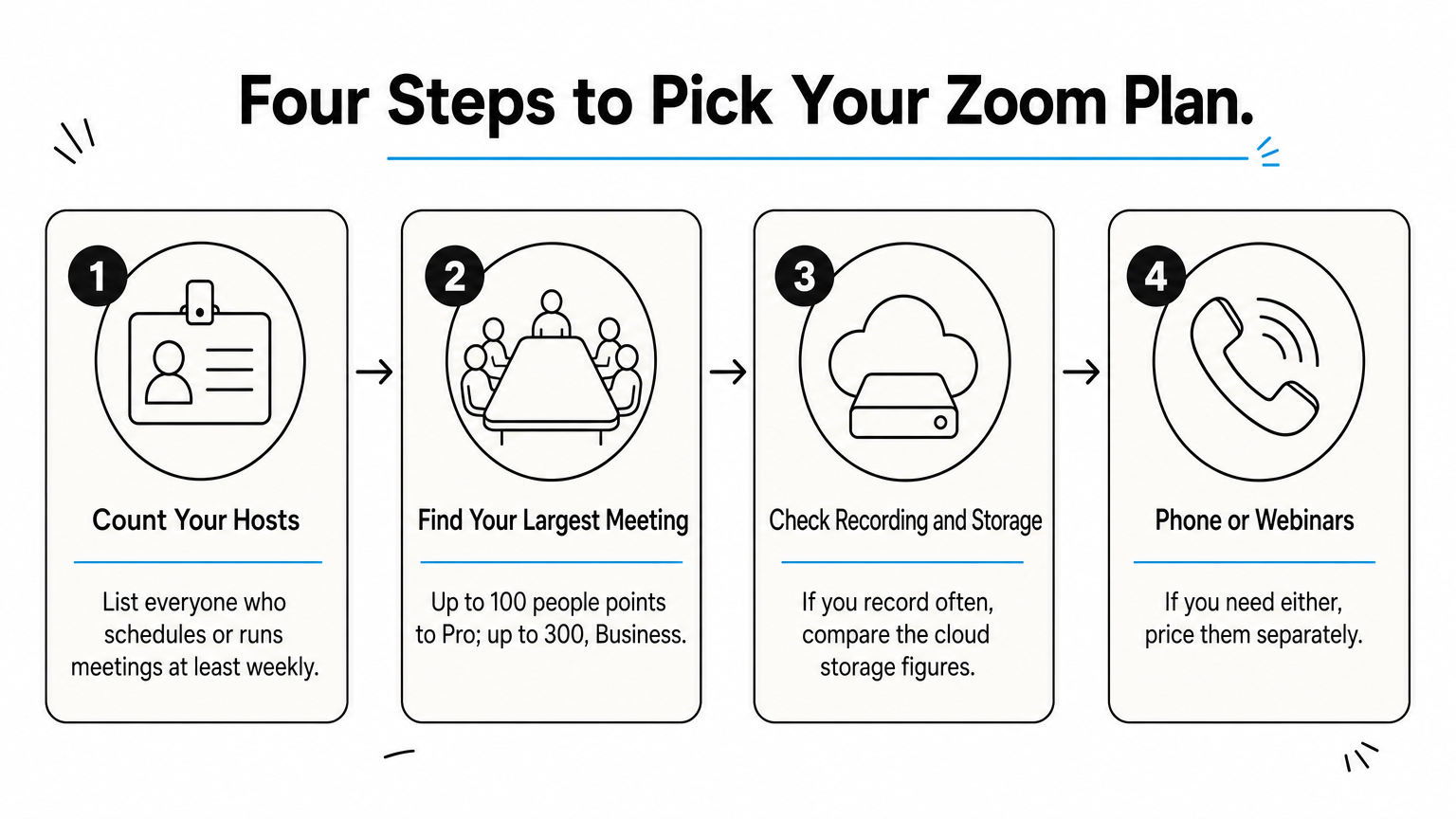
- Count your hosts. List everyone who schedules or runs meetings at least weekly. Occasional hosts can share a license.
- Find your largest regular meeting. Up to 100 people points to Pro. Up to 300 points to Business.
- Check recording and storage needs. If you record often and want cloud copies, compare the storage figures in the table.
- Decide on phone or webinars. If you need either, price them separately, as the add-ons section below shows.
Choose the plan by your largest regular meeting and your host count, then add extras only if you need them.
A worked example with three hosts
Say a team of eight has three people who run meetings. The other five only attend. You need three licenses. On Pro with annual billing, that is 3 × $149.90 = $449.70 per year.
Paying monthly at about $16.99 costs 3 × $16.99 = $50.97 per month, or $611.64 over a year. Annual billing saves $161.94. Moving the same three hosts to Business with annual billing costs 3 × $219.90 = $659.70. That is $210 more than Pro, and it only pays off if you regularly need rooms above 100 people.
Free vs paid Zoom: what actually changes
The free plan runs the same meeting software as paid plans but ends every meeting at 40 minutes. For most people, that limit is the difference they feel first.
The 40-minute limit
Yes, Zoom’s free plan is still capped at 40 minutes per meeting. Basic allows up to 100 participants and unlimited meetings, but the clock stops each one. The host can start a new meeting and everyone rejoins. That works for a quick catch-up. It fails for workshops, interviews and client sessions, where a forced restart looks unprofessional. Paid plans raise the cap to 30 hours.

If your meetings regularly run past 40 minutes, the free plan has already stopped working for you.
What paid plans add
Basic is more generous than many people expect. It includes screen sharing, breakout rooms, virtual backgrounds, a waiting room, chat and local recording. Paid plans add the following:
- Longer meetings: 30 hours instead of 40 minutes.
- Cloud recording storage: 5 GB on Pro and 10 GB on Business, against local-only saving on Basic.
- More whiteboards: three on Pro and Business, unlimited on Enterprise.
- Bigger rooms: up to 300 participants on Business.
- Phone capabilities: available across ThinkMove’s paid plans, with a full-featured PBX on Enterprise.
If the 40-minute cap and local-only recording never bother you, Basic is genuinely enough.
Add-ons and ways to pay less
Zoom’s core plans cover meetings only. Phone, rooms, webinars and education licenses are separate products with their own pricing, and they can double a bill if you add them without planning.
Add-ons priced on top
| Add-on | Typical list price | Billing note |
|---|---|---|
| Zoom Phone | $10 (US and Canada metered), $15 (US and Canada unlimited), $20 (Global Select) | Per user, per month |
| Zoom Rooms | About $49 | Per room, per month |
| Zoom Webinar | Priced by attendee tier | Cost climbs with audience size |
| Zoom Education | About $90 | Per license, per year, with a 20-license minimum |
Webinar plans on ThinkMove’s page cover audiences from 500 to 100,000 attendees. Pick the smallest tier that fits your biggest event. Webinars give you registration, polling and a clear host-versus-audience split, while a regular meeting treats everyone as a participant.
Ways to lower your bill
Start with the cheapest changes. Pay annually if you are sure of your host count. License only real hosts, and reassign a license when someone leaves instead of buying a new one. Review usage after a quarter, because a Business license held by someone who never exceeds 50 attendees is wasted money.
ThinkMove Solutions offers Zoom Pro, Business, Enterprise, Education and Webinar plans through a request form on its site. It also provides Zoom Consulting to match plans to your team, Zoom Support & Setup for licenses and security settings, and Zoom Training by role.
The cheapest Zoom bill comes from licensing only the people who host and billing annually.
Picking a plan without overpaying
Zoom charges per host, and attendees are always free. Basic works until you need meetings longer than 40 minutes or cloud recording. Pro suits most small teams, Business fits rooms up to 300 people, and Enterprise is a quote for large organizations. Phone, rooms and webinars are separate costs, so price them on their own.
If you are weighing plans for a team in Nepal or elsewhere, start with your host count and your largest meeting, then work through the steps above. When you want a second opinion or a quote, you can request a Zoom plan through ThinkMove Solutions and get help matching the license to your team.
Why Choose Us

End-to-End Cloud Deployment
Scalable and secure cloud solutions tailored to your business needs.

Seamless System Integration
Connect all your platforms and tools into a single, efficient ecosystem.

Global Outsourcing Teams
Access top talent worldwide to accelerate growth and cut costs.

Agile, Data-Driven Approach
Make smarter decisions with real-time analytics and flexible workflows.

24/7 Expert Support
Round-the-clock technical assistance to keep your business running smoothly.

 Microsoft Azure

 DevOps
 Software Development
 Staff Augmentation
 React JS
 HTML / CSS / JS
 Website Redesign
 Zoom
 Bulk Sms
 AIMS


 Zoom Pricing: What Each Plan Costs and What You Get