
RDS vs DynamoDB vs Aurora: Which AWS Database Should You Choose in 2026?
 sds sdsd
Introduction
Choosing the wrong AWS database is one of the most expensive architectural mistakes a team can make. Not because it breaks immediately, but because it compounds. You scale into it, build around it, and by the time the limitations appear, migrating away costs months of engineering time and real money.
Amazon RDS, Aurora, and DynamoDB all appear to overlap at first glance. They are all AWS-managed, all production-capable, and all described in AWS documentation with equal authority. The documentation explains what each one is, but rarely tells you which to actually choose for your specific situation, your team, and where your application is headed.
Quick Verdict
| If You Need… | Choose This |
| Traditional SQL / migrations | Amazon RDS |
| Modern scalable SaaS apps | Amazon Aurora |
| Massive-scale low-latency workloads | Amazon DynamoDB |
| Cloud-native relational architecture | Amazon Aurora |
| AI-ready relational workloads | Amazon Aurora |
| Millions of requests per second | Amazon DynamoDB |
What Is the Difference Between RDS, Aurora, and DynamoDB?
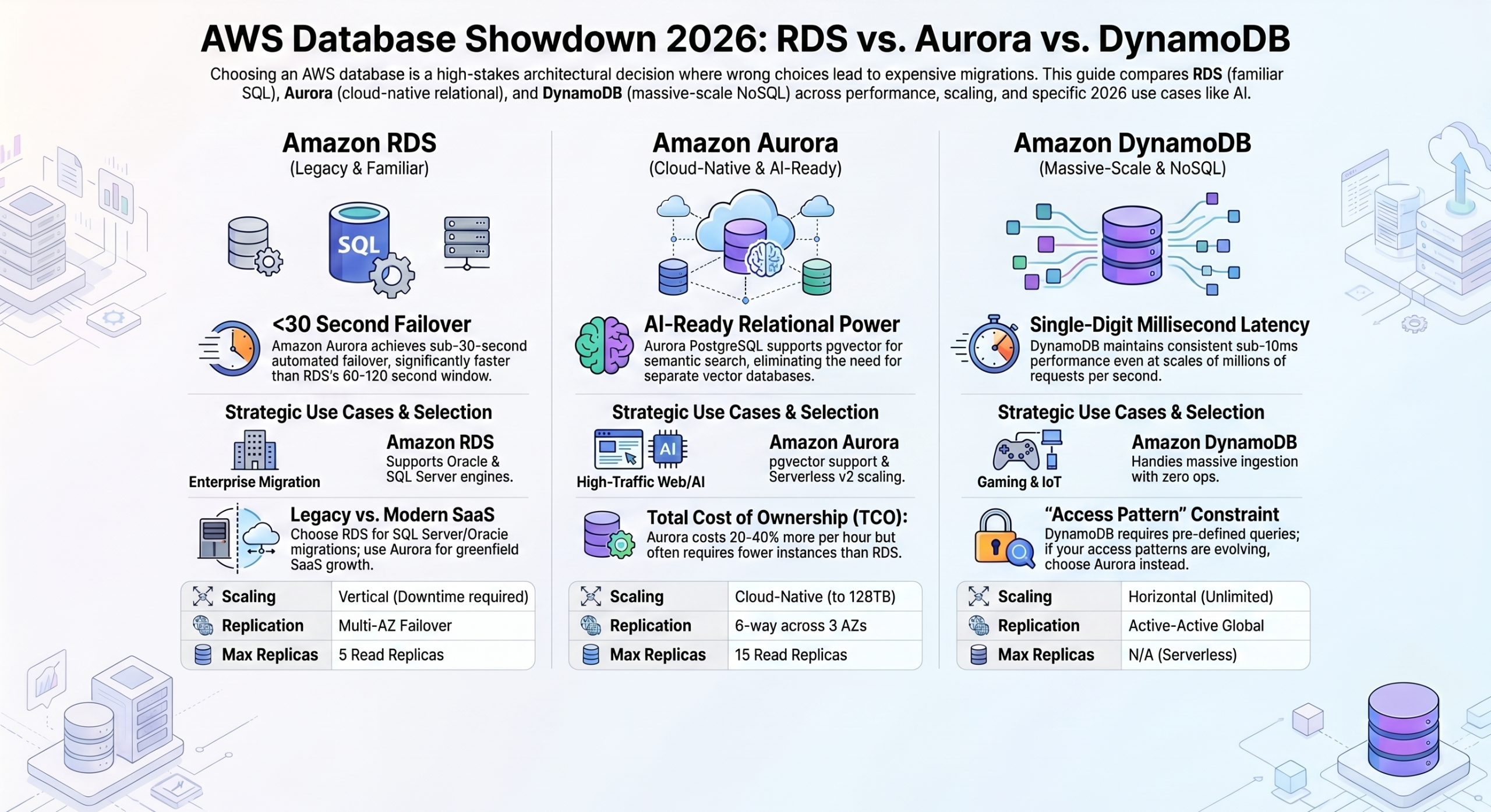
Amazon RDS is a managed service that runs traditional relational engines (MySQL, PostgreSQL, SQL Server, Oracle, & MariaDB) in the cloud. The engine behaves identically to on-premises. RDS is the most familiar option for teams migrating from existing infrastructure.
Amazon Aurora is also relational, but built from scratch by AWS as a cloud-native replacement for MySQL and PostgreSQL. It shares SQL compatibility with those engines but replaces the storage layer with a distributed, fault-tolerant architecture designed for cloud scale. Aurora is not “RDS but faster,” but a fundamentally different architecture.
Amazon DynamoDB is a different category entirely. A fully managed NoSQL key-value and document store built for massive-scale workloads. No joins, no SQL, no fixed schema, but it handles millions of requests per second with single-digit millisecond latency at any scale.
| Feature | RDS | Aurora | DynamoDB |
| Database type | Relational | Relational | NoSQL |
| SQL support | Yes | Yes | No |
| Scaling approach | Vertical-first | Cloud-native | Horizontal |
| Query flexibility | High | High | Limited |
| Best for | Traditional apps | SaaS/web apps | Massive-scale workloads |
Amazon RDS: The Familiar Path
RDS is the on-ramp to AWS for teams with existing relational workloads. If your application runs on MySQL or PostgreSQL today, RDS lets you move to AWS with minimal changes. Your queries work. Your ORM works. Your team already knows how to operate it.
That familiarity is the entire value proposition. RDS is not the most powerful or scalable option. But for the right workload, it is the lowest-friction path to a managed, production-ready database on AWS.
Best use cases: Migrating existing SQL applications, enterprise workloads requiring SQL Server or Oracle, traditional business applications (ERP, CRM, internal tools) where stability matters more than hyperscale.
Strengths:
- Broadest engine support, including commercial engines, Aurora does not offer
- Lowest migration friction, with almost no application changes required
- Predictable instance-based pricing with no access pattern surprises
- Fully managed operations: backups, patching, Multi-AZ failover
Limitations:
- Scales vertically, not horizontally. Write scaling requires larger instances and downtime.
- Multi-AZ failover takes 60–120 seconds, versus Aurora’s sub-30 seconds.
- Storage is instance-bound, not distributed. Less resilient than Aurora’s architecture.
- Not the right long-term home for a growing SaaS product.
Quick Takeaway: RDS is the right choice when compatibility and familiarity matter more than scale. For greenfield SaaS development, Aurora is the better default.
RDS also deserves credit for something often overlooked. It supports Oracle and SQL Server engines with significant enterprise adoption that Aurora does not offer. For organizations running licensed commercial database workloads, this is not a minor point. It is often the deciding factor, and it keeps RDS highly relevant for enterprise infrastructure teams even as Aurora becomes the default for new development.
Amazon Aurora: The Modern Relational Default
Aurora exists because AWS recognized that traditional database architectures were not designed for cloud-scale production workloads. The result is a database that speaks MySQL and PostgreSQL but is built on an entirely different foundation.
The key difference is storage. In Aurora, storage is decoupled from compute and distributed across multiple Availability Zones automatically. It can also be replicated six ways across three AZs on every write. There is no single storage volume to fail. This is not a configuration option; it is the architecture. The practical consequences are significant: failover in under 30 seconds, storage that scales automatically to 128TB, and read replicas that share the same underlying storage and are always current.
Best use cases: SaaS applications, high-traffic web apps, modern startups building products that will scale, any workload that needs production-grade PostgreSQL or MySQL without the scaling limitations of standard RDS.
Strengths:
- Meaningfully better performance than RDS on equivalent hardware for most workloads.
- Sub-30-second automated failover with six-way replication across three AZs.
- Up to 15 read replicas sharing distributed storage. No data copying, always current.
- Aurora Serverless v2 scales compute in fine-grained increments, practical for variable-traffic workloads.
- Strong long-term economics. Higher per-hour cost than RDS, but fewer instances needed and lower incident impact.
Limitations:
- Costs more than RDS at a small scale. Considered overkill for simple, low-traffic applications
- MySQL and PostgreSQL only, but no SQL Server or Oracle support
- Aurora-specific features create a deeper AWS dependency than standard RDS
Aurora and AI Workloads: Aurora PostgreSQL supports the pgvector extension, enabling vector similarity search directly alongside relational data. For applications that need semantic search, recommendation systems, or retrieval-augmented generation or RAG (increasingly common in 2026). This removes the need for a separate vector database. Aurora’s position in the PostgreSQL ecosystem means it benefits from the rapid growth of AI-adjacent tooling that DynamoDB cannot access.
Quick Takeaway: Aurora is the best default relational database for modern AWS applications. If you are building anything that will scale, Aurora is the right starting point.
One practical note on Aurora Serverless v2 that many teams overlook: it is not a development or low-traffic tier. It supports Multi-AZ deployment, read replicas, and Global Databases. It scales in Aurora Capacity Units (ACUs) in increments as fine as 0.5 ACU, responding to load changes within seconds rather than minutes.
For applications with significant traffic variation, like a B2B SaaS with weekday peaks, or a consumer app with evening spikes. Serverless v2 can meaningfully reduce database costs compared to provisioned instances sized for peak load, without any sacrifice in availability or durability.
Amazon DynamoDB: Massive Scale, Different Rules
DynamoDB is not a better version of MySQL. It is a different kind of database solving a different kind of problem. The most common mistake teams make is approaching it with a relational mindset.
DynamoDB is a key-value and document store built for horizontal scale at extreme volumes. No joins. No SQL. No arbitrary queries. What it offers instead: consistent single-digit millisecond performance at any scale, with no capacity planning, no replication to configure, and no administration required.
The fundamental requirement is that you know your access patterns before you design your schema. In a relational database, you can write a new query later. In DynamoDB, your schema is your access pattern.
Best use cases: Gaming backends (leaderboards, player state, high-volume event tracking), shopping carts and session management, IoT data ingestion, real-time personalization, event-driven architectures with DynamoDB Streams and Lambda.
Strengths:
- Truly unlimited horizontal scale. Partitions automatically as volume grows, no ceiling.
- Consistent single-digit millisecond latency at millions of requests per second.
- Zero infrastructure to operate. Fully serverless, no servers, no replication, no storage provisioning.
- Multi-region active-active replication via Global Tables with no custom configuration.
- On-demand pricing charges per request, eliminating over-provisioned capacity costs for variable workloads.
Limitations:
- No joins. Relational data patterns must be handled at the application layer.
- Limited query flexibility. Queries must go through primary keys or pre-defined indexes.
- Schema design is front-loaded. Poor access pattern design leads to expensive scans and future migrations.
- Cost traps with bad design. Hot partitions and excessive index writes can multiply costs significantly.
- No native vector search. Not suitable for semantic retrieval or AI embedding workloads.
The Most Common DynamoDB Mistake: Teams choose DynamoDB because it sounds modern and scalable, without asking whether their access patterns actually suit it. Aurora also scales to tens of millions of users while preserving the query flexibility that DynamoDB deliberately trades away. The right question is not “relational or NoSQL?” It is: do you have predictable, high-volume, low-complexity access patterns that justify the modeling constraints? If uncertain, Aurora is almost always the safer starting point.
Quick Takeaway: DynamoDB is the right choice when scale requirements are extreme, and access patterns are known. When access patterns are still evolving, it is the wrong choice.
What “knowing your access patterns” means in practice: before writing a single line of DynamoDB table code, you should be able to enumerate every query your application needs to make. It includes questions like what you filter by, what you sort by, and what you retrieve together.
In DynamoDB, each of those queries must map to a primary key or a pre-created index. Queries that do not fit that structure require full table scans, which are slow and expensive. Teams that design the schema first and discover the access patterns later almost always face a costly restructuring. The investment in access pattern design before building is not optional. It is the entire foundation of a successful DynamoDB implementation.
Key Tradeoff Comparison
Scalability
RDS scales vertically, with larger instances, with planned downtime for compute changes. Read replicas help with read-heavy workloads but add replication lag and do not address write bottlenecks.
Aurora scales storage automatically up to 128TB without pre-provisioning, handles read scaling efficiently through its shared-storage replica architecture, and manages variable compute through Serverless v2. DynamoDB scales horizontally without limits, partitioning data transparently as volume grows. There is no maximum instance size to bump against and no storage ceiling to plan around.
Pricing
- RDS is the most predictable, with instance-based pricing that is easy to model and budget.
- Aurora costs roughly 20–40% more per instance-hour than comparable RDS instances, but its better performance often means fewer total instances for the same throughput, and faster automated failover reduces the revenue impact of incidents.
- At a meaningful scale, Aurora’s total cost of ownership frequently comes out ahead of RDS despite the higher compute price. DynamoDB pricing depends entirely on access pattern quality.
- Well-designed DynamoDB tables at high volume are extremely cost-efficient, particularly in provisioned mode with reserved capacity. Poorly designed tables, like hot partition keys, unnecessary scans, or excessive Global Secondary Index writes, can become significantly more expensive than equivalent relational infrastructure. The cost risk with DynamoDB is not the pricing model; it is poor schema design.
Operational Burden
RDS requires moderate ongoing management. Storage must be provisioned, instance types must be managed, and scaling decisions should be planned. Aurora reduces operational work significantly at scale: automatic storage scaling, sub-30-second failover, and Serverless v2 eliminate the most common operational headaches.
DynamoDB has near-zero infrastructure operations day-to-day: no servers, no storage, no replication configuration. The operational investment in DynamoDB is entirely front-loaded in schema and access pattern design. Get that right, and ongoing operations are minimal. Get it wrong, and fixing it requires migrating your data model.
AI Readiness
Aurora PostgreSQL is the most AI-ready option. The pgvector extension enables vector similarity search, semantic retrieval, and RAG architectures directly within the relational database, with no separate vector store required.
As applications increasingly integrate LLM-powered features, Aurora’s position in the PostgreSQL ecosystem means it benefits from a growing suite of AI-adjacent extensions and tooling. RDS PostgreSQL also supports pgvector, but without Aurora’s performance and scalability at production AI workload volumes.
DynamoDB has no native vector search capability, and applications that need semantic retrieval alongside DynamoDB data require a separate specialized store, adding architectural complexity.
Which Database Should You Choose?
By Use Case
| Scenario | Best Choice |
| SaaS platform | Aurora |
| Enterprise SQL migration | RDS |
| Gaming backend | DynamoDB |
| AI-enabled application | Aurora |
| IoT event ingestion | DynamoDB |
| Startup MVP | Aurora |
| Traditional business application | RDS |
| Real-time personalization at scale | DynamoDB |
By Company Stage
Startup / MVP: Aurora. The cost premium over RDS is small at low scale, and you avoid the migration you will almost certainly need if you start on RDS and grow.
Scaling SaaS: Aurora as the primary relational store. Add DynamoDB or ElastiCache only when a specific high-volume, low-complexity workload clearly warrants it.
Enterprise modernization: RDS for lift-and-shift migrations. Aurora is the target for workloads that need improved availability. DynamoDB for net-new workloads with well-defined access patterns.
Hyperscale consumer apps: DynamoDB for real-time, high-concurrency workloads. Aurora for relational data requiring flexibility. Most hyperscale architectures combine both.
Common Mistakes
Choosing DynamoDB too early.
Most early-stage applications do not have the access pattern clarity or traffic volume that justifies DynamoDB’s constraints. Aurora scales to tens of millions of users and preserves flexibility as your product evolves.
Staying on RDS too long.
Teams that defer the Aurora migration encounter its limitations, like slow failover, vertical scaling ceilings, and during growth phases when engineering time is scarce.
Treating DynamoDB like SQL.
Modeling data relationally in DynamoDB and fighting the database to answer relational queries leads to expensive scans and eventual schema rebuilds.
Underestimating Aurora Serverless v2.
It is production-grade, Multi-AZ capable, and scales in fine-grained increments. For variable-traffic workloads, it significantly reduces database costs while eliminating capacity planning.
Ignoring future operational costs.
The cheapest database at launch is not always the cheapest at scale. Poor DynamoDB access patterns become expensive fast. RDS vertical scaling needs arrive at the worst moments. Aurora’s higher headline price frequently results in a lower total cost of ownership over time.
Can You Use Multiple Databases Together?
Yes, and modern architectures often do. The framing of “which single database should I use?” is sometimes the wrong question. As applications mature and specific workloads become clearer, adding a second specialized store is often more practical than forcing one database to handle everything. The key is adding that second store for a specific, well-understood reason — not as a precaution or a premature optimization.
Aurora + DynamoDB.
Aurora handles transactional relational data (users, billing, orders). DynamoDB handles the high-volume, low-latency layer (sessions, activity feeds, event tracking). Each serves its purpose without compromise.
Aurora + pgvector for AI.
Aurora PostgreSQL as the primary store, with pgvector enabling semantic search alongside structured queries — answering both “find user 12345” and “find users similar to this profile” in the same database.
DynamoDB Streams + Aurora.
DynamoDB ingests high-volume event data. Streams trigger Lambda functions that aggregate and write summaries to Aurora for reporting — cleanly separating ingestion from analytics.
The principle: use each database for what it does best. The overhead of two well-chosen databases is almost always lower than fighting one that does not fit.
Final Recommendation
Choose RDS if you are migrating existing SQL workloads, your team requires SQL Server or Oracle, or your workload is stable and cost predictability matters more than scale.
Choose Aurora if you are building a modern SaaS or cloud-native application, you need relational SQL with production-grade availability, or your application will eventually need AI-powered features.
Choose DynamoDB if your access patterns are well-defined, your scale requirements are extreme, and you need consistent low-latency performance at volumes relational databases cannot match.
Conclusion
RDS, Aurora, and DynamoDB each solve fundamentally different problems. Choosing correctly means understanding which problem you actually have. It is also being honest about where your application is today versus where you expect it to be in two years.
The best AWS database decision is the one that matches your workload today while still supporting where your application will be two years from now. Start with that framing, apply the guidance in this article to your specific situation, and the right answer usually becomes clear.





How We Do it ?
Powering Growth
with Cloud & Automation

Get started in
minutes
Get the latest tech trends, tips & tools
delivered monthly.

 Microsoft Azure
 DevOps
  Software Development
  Staff Augmentation
  React JS
  HTML / CSS / JS
  Website Redesign
  Zoom
Zoom  Bulk Sms
  AIMS
AIMS  RDS vs DynamoDB vs Aurora: Which AWS Database Should You Choose in 2026?
Send a message
We're here to help and answer any questions regarding Zoom you might have. Reach out to us — we'd love to hear from you!