Zoom Webinar vs Meeting: Which Format Is Best for Your Event, Training, or Business?
 sds sdsd
Introduction
Already inside the Zoom ecosystem? This guide will help you make a confident format decision fast so your next event, training, or meeting runs exactly the way you intend.
You’ve used Zoom. You know the platform. But when it’s time to set up something bigger, like a company town hall, a public webinar, or a training for 200 staff, the Webinar vs Meeting question becomes surprisingly tricky. Choose the wrong format, and you risk confused attendees, broken interaction flows, or an unnecessary licensing cost.
This guide walks you through the decision the way a Zoom implementation consultant would: practical, direct, and built around your actual use case.
So, What’s the Difference Between a Zoom Webinar & a Meeting?
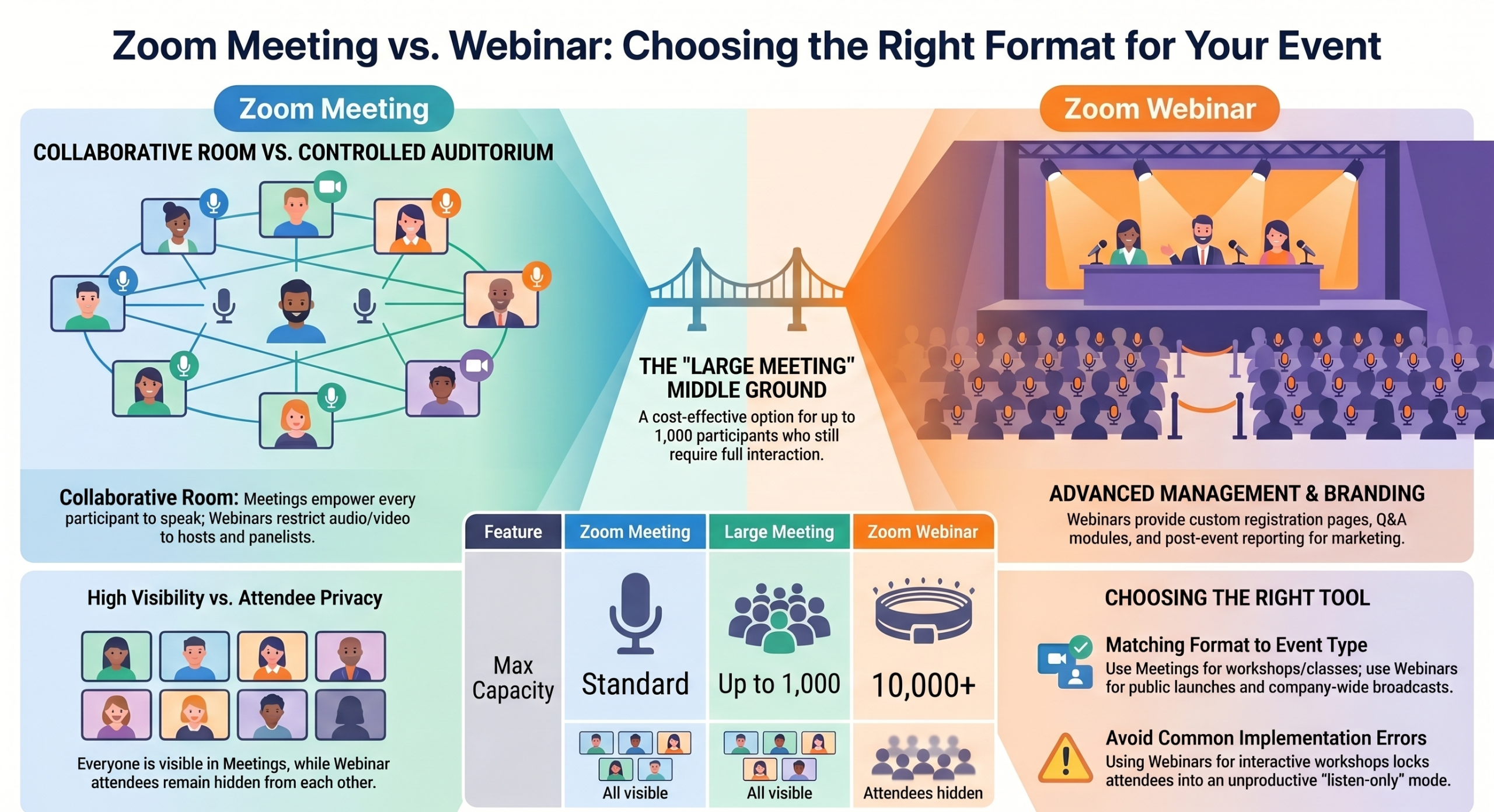
Zoom Meetings are designed for interactive collaboration where everyone can participate. Zoom Webinars are built for large-scale presentations where hosts control audience interaction.
In plain terms, a Meeting feels like a room where everyone has a voice. A Webinar feels like an auditorium where a presenter speaks to an audience.
| Feature | Zoom Meeting | Zoom Webinar |
| Audience interaction | High, including open participation | Controlled by the host |
| Participant visibility | Everyone visible | Attendees hidden |
| Best for | Team meetings & classes | Events & presentations |
| Audience controls | Shared participation | Host-controlled |
| Registration | Basic | Advanced & customizable |
| Requires an add-on license | No | Yes |
Should You Use Zoom Webinar or Zoom Meeting?
This is the question that actually matters and is never properly answered. Here’s the clearest way to decide. Simply:
- If your audience needs to actively participate, collaborate, or interact regularly, Zoom Meeting is usually the right choice.
- If your audience mainly watches, listens, or attends a structured presentation, Zoom Webinar is typically the better fit.
Use Zoom Meetings if you need:
- Team collaboration or standups
- Interactive discussions
- Internal training with active participation
- Small-to-medium classes
- Workshops where attendees engage and contribute
- Breakout rooms and group work
Use Zoom Webinars if you need:
- Public presentations or live broadcasts
- Large virtual events (100–10,000+ attendees)
- Controlled audience interaction
- Marketing webinars or product launches
- Advanced registration and attendee data
- Professional branding and post-event reporting
Not Sure Which Zoom Setup Fits Your Organization?
Choosing between Zoom Meeting, Webinar, or Large Meeting isn’t just about attendee count. The wrong setup can affect engagement, audience management, and even event success.
Common Mistakes Organizations Make When Choosing
This is where only the difference is explained, but you aren’t warned about real-world errors that derail events. These are the most common ones.
Using a Webinar for an interactive workshop: Attendees can’t freely contribute. They’re locked into listen-only mode. If your workshop depends on group discussion or breakouts, a Webinar will frustrate everyone involved.
Using a regular Meeting for a large public event: With everyone unmuted and visible, a 300-person Meeting quickly becomes unmanageable. Background noise, random unmutes, and lack of attendee controls become serious problems.
Underestimating attendee management needs: Teams often forget that Webinars require pre-event setup: registration pages, confirmation emails, attendee roles, and Q&A moderation. Without that prep, the event suffers.
Paying for a Webinar when a Large Meeting would do: If your audience is large but you still want interaction, a Large Meeting add-on is cheaper and more appropriate than a full Webinar license. More on this below.
Many organizations overpay for Webinar licenses when a Large Meeting setup would work better, while others try to run large public events inside standard Meetings and run into moderation problems mid-event. Choosing the correct format early avoids both operational issues and unnecessary licensing costs.
What Attendees Actually Experience
This is almost entirely ignored, but for organizers, how your audience experiences the session is often the most important factor in choosing a format.
What happens in a Zoom Meeting
- Everyone’s camera and name are visible to all participants
- Anyone can unmute and speak freely
- Participants can share their screen if permitted
- Chat is open to all participants
- Breakout rooms are available for group work
- Feels collaborative and open
What happens in a Zoom Webinar
- Attendees are hidden from each other
- Microphones are muted by default. Attendees cannot unmute themselves
- Only hosts and designated panelists can speak or share video
- Interaction happens via the Q&A panel and chat only
- More formal, broadcast-style experience
- Feels like watching a live professional event
Why Event Configuration Matters More Than Most Teams Expect
For internal meetings, default Zoom settings are usually enough. But for webinars, town halls, training sessions, or public-facing events, attendee permissions, registration flows, panelist roles, Q&A moderation, recording settings, and branding configuration become critical.
A technically correct setup often makes the difference between a smooth professional event and a chaotic attendee experience.
Which Is Better for Your Specific Use Case?
| Situation | Best Format | Why |
| Team standup or collaboration | Zoom Meeting | Open participation needed |
| Public webinar or product launch | Zoom Webinar | Audience control & branding |
| Interactive training workshop | Zoom Meeting | Breakouts and discussion required |
| Lecture-style online training | Zoom Webinar | One-way delivery, no participation |
| School classroom (small) | Zoom Meeting | Students need to interact |
| Marketing webinar for leads | Zoom Webinar | Registration data & reporting |
| Company-wide town hall | Either | Webinar for broadcast; Meeting if discussion is wanted |
| Internal company announcement | Zoom Webinar | Controlled broadcast to all staff |
Town hall note:
For a company-wide town hall, use a Webinar if leadership is broadcasting to staff with minimal back-and-forth.
Use Meeting if you want an open discussion, live Q&A, or a collaborative format.
Zoom Webinar vs Large Meeting | An Important Distinction
Many organizations assume they need a Webinar for any large audience, but that’s not always true. Zoom also offers a Large Meeting add-on that significantly raises your participant cap while keeping the interactive meeting format.
| Feature | Large Meeting | Zoom Webinar |
| Interaction style | Interactive as all can participate | Mostly one-way broadcast |
| Attendee visibility | All participants visible | Attendees hidden |
| Capacity | Up to 1,000 participants | Up to 10,000+ attendees |
| Registration | Basic | Advanced |
| Best for | Large collaboration or classes | Broadcast events & presentations |
| Cost | Lower add-on cost | Higher add-on cost |
Use Large Meeting when you have a big audience that still needs to participate and interact. Use Webinar when you’re broadcasting to a large audience that primarily watches and listens.
Key Features Compared
Participant and attendee controls
In Meetings, all participants can unmute, share video, and interact freely unless the host restricts them. In Webinars, only hosts and designated panelists can speak or share video, while attendees are in view-only mode by default. This is the most operationally significant difference for event planning.
Registration and event management
Webinars include built-in registration pages, automated confirmation emails, and attendee tracking. Meetings have basic registration but lack the event management infrastructure that Webinars provide. This makes Webinars far more suitable for any organized external-facing event.
Chat, Q&A, and polling
Both formats support chat and polls. Webinars add a structured Q&A module where attendees submit questions that panelists can manage. This is far better for large audiences than an open chat where messages scroll too fast to track.
Recording capabilities
Both support cloud and local recording. Webinars give you more granular control over what gets recorded and can separate attendee audio from host audio. This becomes useful for post-event editing and replay distribution.
Branding and customization
Webinars support registration page branding, email customization, and sponsor logos. Meetings offer minimal branding options. If your event represents your organization publicly, Webinar branding matters.
Zoom Webinar vs Meeting Pricing Explained
Zoom Meetings come included with any standard paid Zoom license. You don’t need to pay extra. Zoom Webinars are a separate paid add-on that sits on top of your existing license.
The Webinar add-on is priced based on your maximum attendee capacity (500, 1,000, 3,000, 5,000, 10,000+). The higher the capacity tier, the higher the cost. The Large Meeting add-on is priced separately and is generally cheaper for audiences up to 1,000 participants.
Is Zoom Webinar worth paying for?
Yes, if your use case genuinely requires it. If you’re running public-facing events, need professional registration and reporting, or regularly broadcast to audiences of over 300 people, the Webinar add-on is well justified.
If you’re simply hosting a large internal meeting or interactive training session, the Large Meeting add-on is likely sufficient and more cost-effective.
Pricing accurate as of May 2026. Verify current rates at zoom.us/pricing before purchasing.
Quick Decision Framework
| Your Situation | Best Choice |
| Team collaboration or internal meeting | Zoom Meeting |
| Public webinar or live broadcast | Zoom Webinar |
| Interactive workshop or training | Zoom Meeting |
| Lecture-style or one-way delivery | Zoom Webinar |
| A large audience that still needs to participate | Large Meeting add-on |
| Marketing event with lead capture | Zoom Webinar |
| Company-wide broadcast announcement | Zoom Webinar |
Still unsure which Zoom format fits your event?
Choosing the wrong Zoom format can lead to poor attendee experience, limited engagement, or unnecessary licensing costs. This becomes especially true for webinars, training sessions, and large virtual events.
As an authorized Zoom partner in Nepal, we regularly help organizations configure Zoom Meetings, Webinars, and Large Events based on audience size, interaction requirements, and event goals. We help businesses, educational institutions, NGOs, and organizations in Nepal:
- Choose the right Zoom licenses
- Set up Zoom Webinars and Large Meetings
- Configure professional event settings
- Optimize attendee experience and moderation
- Scale Zoom for training, events, and internal communication
Explore Zoom Solutions in Nepal→
Or contact us directly if you’re unsure whether Zoom Meeting, Webinar, or Large Meeting is the right fit for your event.



How We Do it ?
Powering Growth
with Cloud & Automation
Get started in
minutes
Get the latest tech trends, tips & tools
delivered monthly.

 Microsoft Azure
 DevOps
  Software Development
  Staff Augmentation
  React JS
  HTML / CSS / JS
  Website Redesign
  Zoom
Zoom  Bulk Sms
  AIMS
AIMS  Zoom Webinar vs Meeting: Which Format Is Best for Your Event, Training, or Business?
Send a message
We're here to help and answer any questions regarding Zoom you might have. Reach out to us — we'd love to hear from you!