Learn about the AWS Database & Its Services
 sonam seo
Introduction
Best AWS Database By Use Case:
- Best for web apps & SaaS: Amazon Aurora
- Best for scale & speed: Amazon DynamoDB
- Best for familiar SQL (easy start): Amazon RDS
- Best for analytics & data warehousing: Amazon Redshift
- Best for AI & vector search: Amazon S3 Vectors + Aurora (pgvector)
- Best for globally distributed SQL: Amazon Aurora DSQL
- Best for caching & performance: Amazon ElastiCache
AWS offers 15+ purpose-built database services. If you’ve ever opened the AWS console trying to pick one, you know exactly how overwhelming that feels. RDS, Aurora, DynamoDB, Redshift, DocumentDB, or QLDB. The list goes on.
Here’s the thing: there’s no single “best” AWS database. Each one was built to solve a specific problem. Pick the right one and your app flies. Pick the wrong one, and you’re either overpaying, under-scaling, or rebuilding six months later.
This guide cuts through all of it. You’ll get a complete categorized list of every AWS database service and a decision table so you know exactly which one fits your use case, including the newer AI-ready services most guides completely ignore.
What Are Amazon Database Services?
Amazon database services are fully managed database solutions hosted on AWS infrastructure. “Fully managed” means AWS handles the heavy lifting from provisioning, patching, and backups to replication and scaling. This means your team focuses on building, not babysitting servers.
The key philosophy behind AWS databases is purpose-built design. Instead of offering one universal database and calling it done, AWS built separate services optimized for specific workload types: transactional, analytical, key-value, graph, time-series, and now vector/AI workloads.
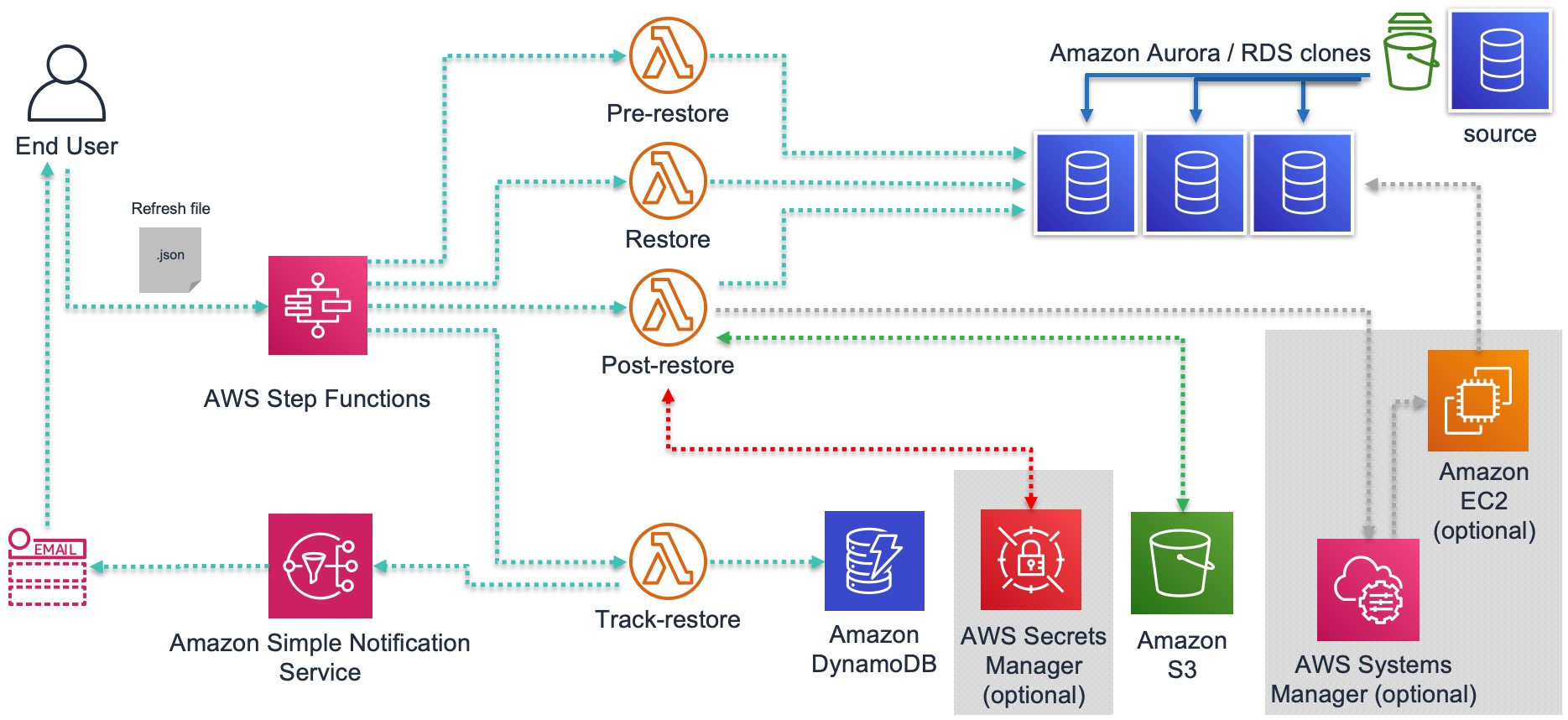
This approach gives you the best-in-class performance for each use case. It also means you need to know which tool fits which job.
Why Does AWS Have So Many Databases?
One database engine cannot be optimized for everything, and not every database just “stores data.” A relational database built for structured transactions (like RDS) performs very differently from a key-value store built for millisecond reads at massive scale (like DynamoDB).
Both are required, and insisting on using only one doesn’t make you efficient; it makes your projects harder.
AWS recognized early that different workloads have fundamentally different requirements:
- E-commerce checkout needs ACID transactions and structured queries
- Real-time gaming leaderboards need sub-millisecond reads at millions of requests/second
- IoT sensor data needs time-ordered writes at massive volume
- AI-powered search needs vector similarity queries, not SQL joins
The result is a portfolio of purpose-built databases. Each one wins in its lane. Your job is to match the lane to your workload.
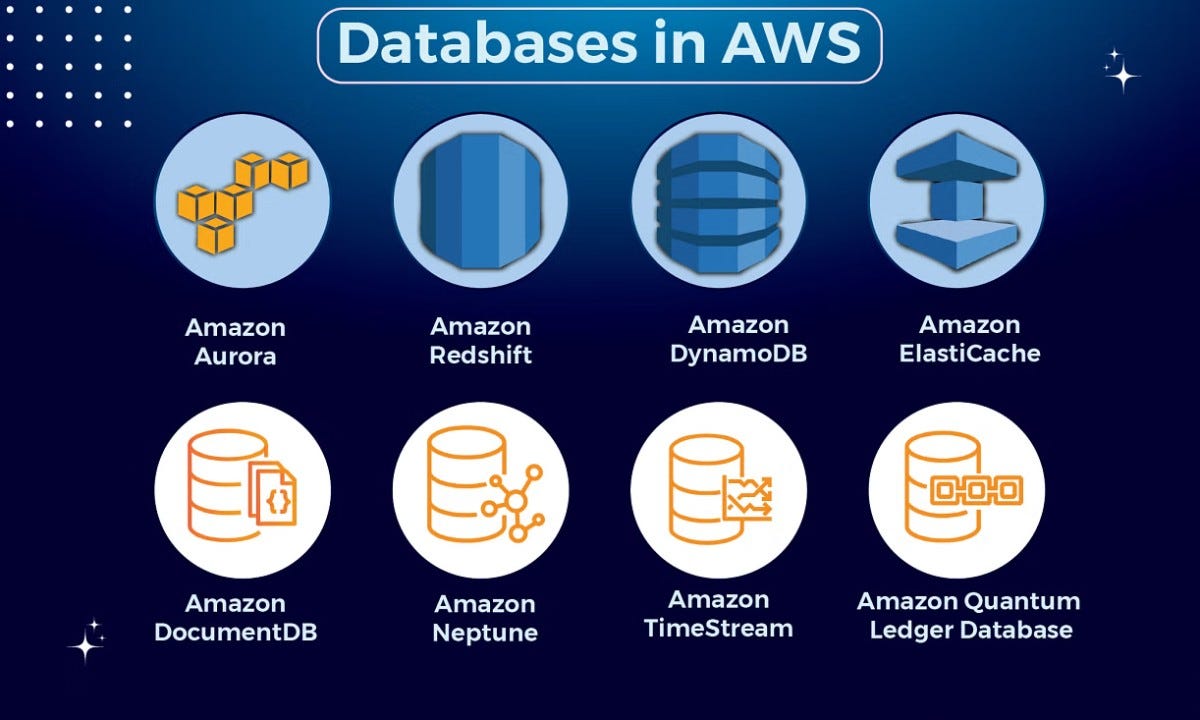
Complete List of AWS Database Services (2026)
| Category | Service | Best For | Serverless? |
| Relational | Amazon RDS | Traditional SQL apps, migrations | ✅ (some engines) |
| Relational | Amazon Aurora | High-performance SaaS, web apps | ✅ Aurora Serverless v2 |
| Relational | Amazon Aurora DSQL | Global, distributed SQL apps | ✅ Fully serverless |
| NoSQL / Key-Value | Amazon DynamoDB | Massive scale, low-latency apps | ✅ On-demand mode |
| NoSQL / Document | Amazon DocumentDB | MongoDB-compatible workloads | ✅ Elastic Clusters |
| NoSQL / Wide Column | Amazon Keyspaces | Cassandra workloads, no server ops | ✅ Fully serverless |
| In-Memory / Cache | Amazon ElastiCache | Caching layer, session storage | ❌ |
| In-Memory / Primary | Amazon MemoryDB | Durable Redis-compatible primary DB | ❌ |
| Analytics | Amazon Redshift | Data warehousing, BI, and large queries | ✅ Serverless option |
| Graph | Amazon Neptune | Relationship data, knowledge graphs | ✅ Serverless option |
| Time-Series | Amazon Timestream | IoT, metrics, operational data | ✅ Fully serverless |
| Ledger | Amazon QLDB | Immutable audit trails, compliance | ✅ Fully serverless |
| Vector / AI | Amazon S3 Vectors | AI embeddings, RAG, vector search | Yes |
New in 2025–2026: Aurora DSQL (GA December 2025), S3 Vectors (GA December 2025), Aurora PostgreSQL Serverless express configuration (March 2026)
Types of AWS Databases Explained
Relational Databases
Relational databases store data in structured tables with rows and columns. They use SQL and support complex queries, joins, and ACID transactions. Best for workloads where data relationships matter and consistency is non-negotiable.
Amazon RDS is AWS’s managed relational database service supporting six engines: PostgreSQL, MySQL, MariaDB, SQL Server, Oracle, and Db2. It removes infrastructure management (i.e., no manual patching or hardware provisioning), while letting you run the familiar database engine your team already knows.
Best for: Lift-and-shift migrations, enterprise apps, teams moving from on-premises SQL.
Not ideal for: Workloads that need massive horizontal scale or sub-millisecond latency.
Amazon Aurora is AWS’s proprietary relational engine. It is also MySQL and PostgreSQL-compatible, but built from the ground up for cloud performance. It delivers significantly higher throughput than standard RDS. It also provides automatic replication across multiple Availability Zones and storage that can scale automatically up to 128TB.
Aurora Serverless v2 scales compute up and down with your traffic, making it cost-effective for variable workloads.
Best for: SaaS platforms, high-traffic web apps, production PostgreSQL/MySQL workloads that need reliability and performance.
Not ideal for: Simple or low-traffic apps where RDS cost is already fine.
Amazon Aurora DSQL is the newest addition to the Aurora family. It is a fully serverless, distributed SQL database designed for active-active multi-region deployments. It reached general availability in December 2025 and is expanding rapidly into regions in 2026.
Unlike Aurora Serverless v2, DSQL is built for truly distributed, always-available architectures with strong consistency. You don’t manage capacity, replicas, or failover, but handle all of it.
Best for: Globally distributed applications, multi-region SaaS, and apps that cannot tolerate downtime.
Not ideal for: Standard single-region apps where Aurora Serverless v2 is simpler and sufficient.
NoSQL Databases
NoSQL databases trade the rigid structure of relational tables for flexibility, scale, and speed. AWS offers three distinct NoSQL types, with each optimized for a different data model.
Amazon DynamoDB (Key-Value + Document) is AWS’s flagship NoSQL database. It is fully managed, multi-region capable, and built for workloads where scale and speed are non-negotiable. It handles millions of requests per second with single-digit millisecond latency and scales storage automatically without downtime.
Best for: High-scale consumer apps, gaming, IoT, shopping carts, session management, and real-time leaderboards.
Not ideal for: Complex relational queries, ad-hoc reporting, or workloads where you don’t know your access patterns upfront.
Amazon DocumentDB (Document) is AWS’s managed document database with MongoDB API compatibility. It’s designed for teams running MongoDB workloads who want the operational simplicity of a managed AWS service without rewriting application code.
Best for: Content management, catalogs, user profiles, and any workload currently on MongoDB. Not ideal for: Teams not already using MongoDB (DynamoDB is often a better native choice).
Amazon Keyspaces (Wide Column) is a fully serverless, managed Apache Cassandra-compatible database. You run Cassandra workloads using existing Cassandra application code and tooling, without provisioning or managing servers.
Best for: High-write workloads, time-series-adjacent data, teams migrating from self-managed Cassandra clusters.
Not ideal for: Teams not already on Cassandra (Timestream or DynamoDB is usually simpler).
In-Memory Databases
In-memory databases store data in RAM rather than disk, delivering microsecond-level response times. AWS has two services here, and they serve different purposes that are commonly confused.
Amazon ElastiCache is a managed in-memory caching layer supporting Redis and Valkey (an open-source Redis fork). It sits in front of your primary database to reduce load and accelerate response times. It is a cache, not a primary data store.
Best for: Database query caching, session storage, rate limiting, and leaderboards as a secondary layer.
Not ideal for: Storing data that must survive a restart. ElastiCache is not durable by design.
Amazon MemoryDB is frequently confused with ElastiCache, but they are fundamentally different. MemoryDB is a durable, Redis-compatible primary database, not a cache. Data is persisted across restarts using a distributed transaction log. This makes it safe to use as your main data store.
Best for: Applications that need Redis-compatible APIs with the durability of a primary database. Microservices, real-time apps, and financial data with low-latency requirements.
Not ideal for: Pure caching use cases. ElastiCache is simpler and cheaper for that.
Analytics Databases
Amazon Redshift is AWS’s managed data warehouse. It is built for running complex analytical queries across massive datasets, not for transactional workloads. It uses columnar storage and massively parallel processing (MPP) to handle petabyte-scale analytics efficiently.
Best for: Business intelligence, reporting, data warehousing, running queries across billions of rows.
Not ideal for: Transactional apps, real-time writes, or row-level operational data.
Graph Databases
Amazon Neptune is a fully managed graph database supporting two popular graph models: Property Graph (Gremlin) and RDF (SPARQL). It’s designed for data where relationships between entities are as important as the entities themselves.
Neptune Analytics now supports vector similarity search alongside graph traversal, making it increasingly relevant for AI-powered applications.
Best for: Social networks, fraud detection, recommendation engines, knowledge graphs, identity resolution.
Not ideal for: Standard relational or document workloads where graph relationships don’t exist.
Time-Series Databases
Amazon Timestream is a purpose-built time-series database optimized for storing and querying data that is inherently ordered by time: sensor readings, application metrics, financial ticks, and server telemetry. It automatically tiers data between in-memory and magnetic storage based on query patterns, keeping costs predictable at scale.
Best for: IoT sensor data, DevOps monitoring, application performance metrics, and industrial telemetry.
Not ideal for: General-purpose data storage or relational workloads.
Ledger Databases
Amazon QLDB (Quantum Ledger Database) maintains a cryptographically verifiable transaction log. Every data change is permanently recorded and cannot be altered or deleted. This makes it ideal for compliance and audit use cases where data integrity must be provable.
Best for: Financial transaction records, supply chain tracking, regulatory audit trails, systems of record.
Not ideal for: General-purpose storage or any workload that needs to update or delete historical records.
Vector Databases & AI-Ready Storage
Amazon S3 Vectors is a genuinely new product category launched in late 2025. It adds native vector indexing directly into Amazon S3. This means you can store and query AI embeddings without running a separate vector database service. It supports up to 2 billion vectors per index with query latency under 100ms for frequent queries (90% lower cost than dedicated vector database services).
Best for: RAG pipelines, semantic search, and AI-powered recommendation engines where cost and simplicity matter.
Vector capabilities also exist natively in:
- Aurora PostgreSQL: via the pgvector extension, enabling SQL + semantic search in one database
- Neptune Analytics: vector similarity search alongside graph traversal for AI reasoning apps
- OpenSearch Service: hybrid keyword + vector search for search-heavy applications
Which AWS Database Should You Use?
| If You Need To… | Use This | Why |
| Run a standard SQL web app | Amazon Aurora | Better performance than RDS, fully managed |
| Migrate an existing SQL database | Amazon RDS | Familiar engines, minimal code changes |
| Scale to millions of requests/sec | Amazon DynamoDB | Designed for exactly this |
| Build a globally distributed SQL app | Amazon Aurora DSQL | Multi-region strong consistency, zero ops |
| Run analytics on large datasets | Amazon Redshift | MPP columnar engine built for it |
| Cache your database queries | Amazon ElastiCache | In-memory speed reduces DB load |
| Use Redis as a primary database | Amazon MemoryDB | Durable Redis-compatible primary store |
| Work with MongoDB workloads | Amazon DocumentDB | Drop-in MongoDB compatibility |
| Migrate from self-managed Cassandra | Amazon Keyspaces | Serverless Cassandra, no ops overhead |
| Store IoT or metric time-series data | Amazon Timestream | Built for time-ordered data at scale |
| Build relationship/graph data | Amazon Neptune | Graph traversal + vector search |
| Maintain immutable audit records | Amazon QLDB | Cryptographically verifiable history |
| Build AI apps with vector search | Amazon S3 Vectors | Native vector indexing, lowest cost |
AWS Databases for AI & Modern Applications (2026)
The biggest shift in the AWS database landscape in 2025–2026 isn’t a new service, but a new role. Databases are no longer just storage. They are now active components in AI pipelines.
Here’s what that looks like in practice:
Vector search is now native, not an add-on: S3 Vectors eliminates the need for a separate vector database for most AI use cases. Combined with Amazon Bedrock, you can build a complete RAG (Retrieval-Augmented Generation) pipeline entirely within AWS without stitching together third-party services.
Your existing relational database can now do semantic search: Aurora PostgreSQL with the pgvector extension lets you run vector similarity queries alongside standard SQL. This means a SaaS app using Aurora can add AI-powered search to an existing database without migrating to a new service or managing separate infrastructure.
Graph databases are becoming AI reasoning engines: Neptune Analytics now supports vector similarity search alongside graph traversal. This enables AI applications to not just retrieve nearest-neighbor vectors. Fraud detection, knowledge graphs, and recommendation engines are the immediate beneficiaries.
The serverless trend is accelerating: Aurora DSQL, DynamoDB on-demand, Keyspaces, Timestream, and QLDB are all fully serverless. Aurora Serverless v2 now spins up in seconds. The direction is clear: AWS is moving toward a world where database capacity management is largely automated. For most teams, that’s a meaningful reduction in operational overhead.
AWS Database Pricing: What to Expect
AWS database pricing follows the same pay-as-you-go model as the rest of the platform. The key variables across services are:
Instance-based pricing (RDS, Aurora, ElastiCache, MemoryDB): You pay for the instance size you provision, storage used, and data transfer. Reserved Instances offer 40–60% discounts for predictable workloads.
Serverless / on-demand pricing (DynamoDB, Aurora Serverless, Keyspaces, Timestream, QLDB): You pay per request, read/write unit, or compute-second consumed. Ideal for variable or unpredictable traffic. No minimum commitment.
Storage-based pricing (S3 Vectors, Redshift Serverless): Primarily driven by data volume stored and queries run, not provisioned capacity.
Free Tier availability: Aurora PostgreSQL Serverless, Aurora DSQL, DynamoDB, RDS (select engines), and ElastiCache all have Free Tier options. These are useful for development and testing before committing to production spend.
For current pricing per service, always check the AWS Pricing page directly, as rates change and vary by region.
Common Mistakes When Choosing AWS Databases
- Using RDS when Aurora is the better choice. Many teams default to RDS because it’s familiar. For net-new production workloads on PostgreSQL or MySQL, Aurora almost always delivers better performance, reliability, and long-term cost-efficiency. The migration from RDS to Aurora is straightforward, but you’re better off starting there.
- Using DynamoDB without knowing your access patterns. DynamoDB is exceptional when you design your data model around it. It’s painful when you don’t. If you need flexible ad-hoc queries across multiple attributes, DynamoDB’s single-table design requires upfront planning. Going in without that plan leads to expensive scans and complex workarounds.
- Treating ElastiCache as a database. ElastiCache is a cache. It is not designed to be your primary data store. Data can be lost on restart. If you need Redis APIs with durability, use MemoryDB instead.
- Ignoring serverless options for variable workloads. Provisioning a fixed RDS instance for a workload with unpredictable traffic is one of the most common ways to overpay on AWS. Aurora Serverless v2, DynamoDB on-demand, and Keyspaces scale with your traffic automatically. For startups and early-stage products, especially, start serverless and provision fixed capacity only when your traffic patterns are stable and predictable.
- Going deep on one service when your app needs two. Many production architectures use multiple AWS databases together: Aurora for relational transactional data, ElastiCache in front for caching, and S3 Vectors for AI search. AWS databases are designed to work together. Forcing one service to do everything is often the root cause of performance and cost problems.
Conclusion
AWS’s database portfolio is broad by design because no single engine is optimal for every workload.
Here’s the short version of everything above:
- Start with Aurora if you’re building a relational SQL app on AWS
- Choose DynamoDB when you need scale, speed, and know your access patterns
- Use Redshift when analytics and reporting are the primary job
- Add S3 Vectors or pgvector when your app needs AI-powered search
- Consider Aurora DSQL if you’re building for global distribution from day one
The right database choice isn’t permanent. AWS provides migration tooling across services, but getting it right early saves significant rework. So, you should always ask for a consultation from cloud experts.





How We Do it ?
Powering Growth
with Cloud & Automation

Get started in
minutes
Get the latest tech trends, tips & tools
delivered monthly.

 Microsoft Azure
 DevOps
  Software Development
  Staff Augmentation
  React JS
  HTML / CSS / JS
  Website Redesign
  Zoom
Zoom  Bulk Sms
  Cybersecurity