
Cloud computing cost savings are real, but they come from how you run the cloud, not from moving to it. The best picks fall into three groups. Structural savings come from skipping hardware, paying for usage and handing off maintenance. Tuning savings come from rightsizing, pricing models and storage tiers. Discipline savings come from shutdown schedules, tags and budgets. Fast-growing companies gain most from the first group, teams with an existing bill gain most from the second, and finance-minded leaders gain most from the third.
The problem is that many businesses move workloads and then watch the bill climb. Flexera has reported that almost 35% of cloud spend is wasted, mostly on idle, oversized or forgotten resources. This article walks through eight ways to cut that waste, with figures, worked examples and the catch for each.
At ThinkMove Solutions we plan, migrate and optimize cloud setups on AWS, Azure and Google Cloud.
Does cloud computing actually save money?
The short answer
Yes, cloud computing saves money when you design for it, and it can cost more when you copy your old setup into it. The savings come from three structural shifts. You stop buying hardware up front, you pay for the capacity you use, and the provider takes over part of the maintenance. These shifts only turn into real savings when someone also tunes the environment.
Waste is the main enemy. Cloud is still the default home for new applications and for AI workloads that need GPUs and fast storage. So the question is not whether to use it. The question is how to keep the bill honest.
What savings to expect
The average cost savings with cloud computing depend more on your migration path than on your provider. Practitioner reports cluster around the ranges below. Treat them as ballparks, not promises.
| Approach | Typical change in cloud spend |
|---|---|
| Lift-and-shift with no redesign | From about 10% lower to 40% higher |
| Replatforming and rightsizing | 10% to 40% lower |
| Mature FinOps practice | 20% to 55% lower |
Here is a worked example. On a $10,000 monthly bill, replatforming that saves 10% to 40% frees $1,000 to $4,000 a month. That is $12,000 to $48,000 a year. A pure lift-and-shift could push the same bill the other way.
Moving to the cloud does not save money; redesigning for the cloud does.
When on-premises still wins
Steady workloads on hardware you already own are the classic case. A database that runs flat out all year gains nothing from elasticity. Over the long run, owned equipment can be cheaper than the cloud for that kind of load. Run a three-year total cost comparison that includes power, cooling, space, staff and disaster recovery before you decide.
Hybrid is a legitimate answer. Move variable and short-lived workloads first, keep the steady core where it is, and revisit the split each year.
1. Skip upfront hardware spending
How it saves money
Cloud turns a large capital purchase into a monthly operating cost. You stop buying servers, storage arrays and network gear that sit partly idle. You also stop paying for the space, power and cooling that go with them. The three-to-five-year hardware refresh cycle drops out of your plan.
Take a hypothetical $40,000 server depreciated over four years. That is $10,000 a year before power, cooling, rack space and staff time. The cloud only wins if its yearly cost for the same work is lower than that full total. This is why the three-year total cost of ownership matters more than the sticker price.
Compare total cost of ownership over three years, not the price on the quote.
How to put it into practice
Start with the hardware you will have to replace soon.
- List every server and note its refresh date.
- Move workloads whose hardware is due for replacement first.
- Compare three-year costs, including power, cooling, space and disaster recovery.
- Leave paid-off, steady systems in place and run a hybrid setup.
Who it suits
Startups and fast-growing companies gain the most, because they avoid guessing capacity before demand is proven. Businesses facing a hardware refresh come a close second.
The catch is that lower upfront cash is not the same as lower lifetime cost. If a server is already paid for and runs flat all year, moving it can raise your bill.
2. Pay only for the capacity you use
How it saves money
On-premises systems have to be sized for the busiest day of the year. Everything above average load is stranded capacity that you paid for and rarely use. Elastic cloud resources grow and shrink with demand, so you pay for peak capacity only while the peak lasts.
Serverless takes this furthest. A function service such as AWS Lambda bills for requests and execution time, so an idle workload costs close to nothing. A seasonal or spiky workload sees the biggest drop.
Elasticity turns your busiest day from a permanent cost into a temporary one.
How to put it into practice
Autoscaling only saves money when the rules match real behavior.
- Set a minimum and a maximum instance count for each service.
- Scale on real signals such as CPU or request count.
- Move event-driven or spiky jobs to serverless.
- Review scaling rules after each major release.
Who it suits
Retail, media, ticketing and education businesses with seasonal or event-driven traffic benefit most. So does any app with a quiet night and a busy day.
Flat workloads gain little. If usage barely moves, elasticity has nothing to trim, and the pricing models in item 5 matter more.
3. Cut maintenance and IT operations work
How it saves money
The provider runs the data centers, so physical repairs, hardware replacement and facility costs leave your budget. With managed databases, queues and similar services, patching and failover leave your team’s workload too.
The shared responsibility model sets the limit. The provider secures and operates the underlying infrastructure, while you stay responsible for your workloads, data and configuration. You only save on the layers the provider takes over.
You save on the layers the provider runs, and you still pay for the layers you own.
How to put it into practice
Measure the time before you move anything, or you will never know what you saved.
- Replace self-hosted databases with managed ones where load is bursty.
- Record admin hours per month before and after the change.
- Redirect freed hours to product work instead of assuming a headcount cut.
- Compare the managed hourly rate with self-hosted cost including staff time.
Who it suits
Small IT teams with many systems to look after gain the most. So do companies without round-the-clock on-call staff.
Managed services cost more per hour than a bare virtual machine. They pay off only when the staff time they free is real and put to good use.
4. Rightsize instances and databases
How it saves money
Rightsizing means matching each instance or database to the load it actually carries. Oversized machines are the most common source of waste, especially after a lift-and-shift. Within one instance family, each size down typically halves the hourly price.
With illustrative prices, a server at $0.20 an hour costs about $146 a month over 730 hours. One size down at $0.10 an hour costs about $73. Across 20 servers, that is $1,460 a month saved with no change to the application.
Most oversized servers can drop one size with no change that users notice.
How to put it into practice
Let the data decide, not a gut feeling.
- Review 30 to 60 days of CPU, memory and network data.
- Flag instances that sit below roughly 20% CPU.
- Step down one size at a time and monitor after each change.
- Use provider tools such as AWS Compute Optimizer, Azure Advisor or Google Cloud’s rightsizing recommendations.
Who it suits
Any business with a cloud bill older than a few months should do this, particularly after a rushed migration.
Memory-bound and latency-sensitive workloads need headroom. Check memory use, not CPU alone, before you shrink them.
5. Match pricing models to your workloads
How it saves money
Providers discount heavily for commitment and for flexibility. Reserved instances and savings plans trade a one or three year commitment for lower rates. Spot capacity trades reliability for the deepest discounts.
| Model | Typical discount vs on-demand | Best for | Catch |
|---|---|---|---|
| Reserved instances | Around 50% to 70% | Steady, always-on workloads | Tied to a configuration for 1 or 3 years |
| Savings plans | Up to 72% (AWS EC2 Instance plans) | Steady spend with some flexibility | Unused committed spend is wasted |
| Spot instances | Up to 90% | Batch jobs, stateless services | Can be interrupted on short notice |
Discounts vary by provider, term and region. As an example, a database that costs $1,000 a month on demand and gets a 40% commitment discount costs $600. That saves $4,800 a year.
Optimize first, commit second, or you lock in the waste you meant to remove.
How to put it into practice
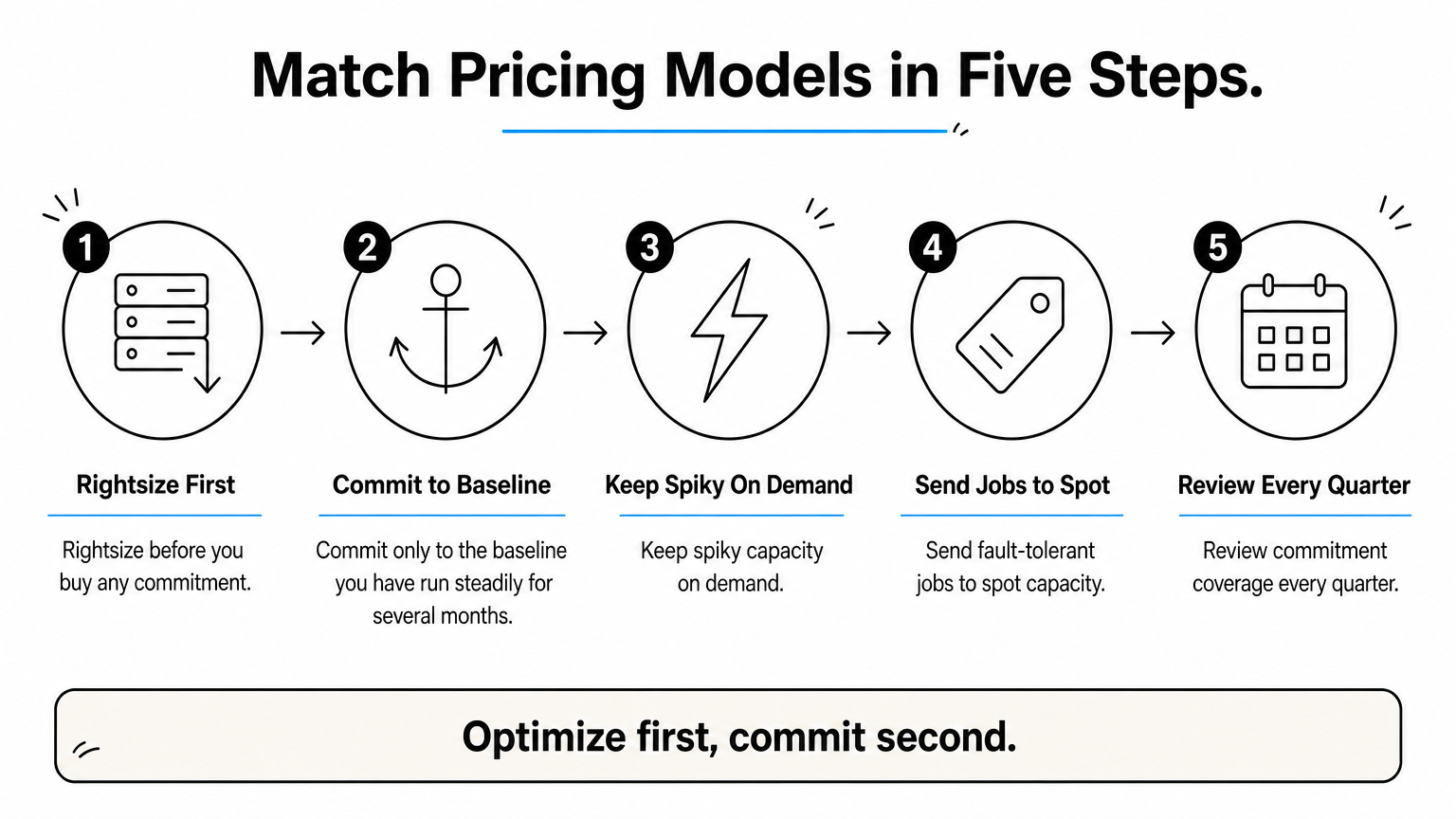
Order matters here more than the discount itself.
- Rightsize before you buy any commitment.
- Commit only to the baseline you have run steadily for several months.
- Keep spiky capacity on demand.
- Send fault-tolerant jobs to spot capacity.
- Review commitment coverage every quarter, using AWS Savings Plans reports or your provider’s equivalent.
Who it suits
Companies with a stable core workload and finance teams that want predictable bills get the most from this.
The risk is lock-in. Once you commit to a configuration, you cannot downsize it for the term, so a premature commitment turns waste into a contract.
6. Tier your storage and cut data transfer
How it saves money
Storage bills grow quietly. Data you rarely read does not belong in a fast, expensive tier. Snapshots, logs and old backups also pile up unless you delete them. Moving cold data to archive tiers is the core of cloud storage cost savings.
Two more costs sit around storage. Most providers include a small free allowance, but business data is billed per gigabyte each month. You also pay for requests and for data leaving the provider’s network or crossing regions.
Storage costs rise with neglect, not with use.
How to put it into practice
Start by finding what nobody has touched.
- Find buckets and volumes with no reads in the last 90 days.
- Set lifecycle rules that move aging data to colder tiers and delete expired logs.
- Delete orphaned snapshots and unattached disks.
- Keep chatty services and their data in the same region.
Who it suits
Companies with backups, logs, media archives and compliance records gain the most.
Cold tiers charge retrieval fees and often set minimum storage periods. Archiving data you actually read can cost more than leaving it where it was.
7. Shut off idle and non-production resources
How it saves money

Dev, test and QA environments rarely need to run at night or on weekends. A week has 168 hours. If your team works 50 of them, about 70% of the hours are idle. Turning those environments off cuts their compute cost by about the same share.
Take a test server at $0.10 an hour. Running nonstop it costs $73 a month. Running 50 hours a week, about 217 hours a month, it costs about $22. That saves roughly $51 per server, or about $510 a month across ten servers.
A server that is switched off costs nothing, and a forgotten one costs the same as a busy one.
How to put it into practice
Automation beats reminders, because nobody remembers to switch things off.
- Tag every instance with its environment.
- Schedule start and stop times with your provider’s scheduling tools or a small script.
- Delete unattached disks, idle load balancers and sandboxes with no activity for weeks.
- Let developers restart an environment on demand.
Who it suits
Development teams, agencies and QA-heavy organizations see the clearest gains.
If your team spans time zones, the working window is wider, so schedule per team. Do not switch off stateful environments or overnight batch jobs without checking what depends on them.
8. Tag spending and set budget alerts
How it saves money
Costs that nobody owns never get fixed. Tags for owner, application, environment and cost center show who spends what. The people who can change a setting then see the bill for it.
Budgets add the early warning. Set alerts at 80% and 100% of the monthly budget, plus an anomaly alert for sudden jumps. A spike caught in days costs far less than one found at month end.
What nobody owns, nobody trims.
How to put it into practice
Keep the rules few enough that people follow them.
- Define four mandatory tags and enforce them when resources launch.
- Use provider tools such as AWS Budgets, Azure Cost Management or Google Cloud Billing budgets.
- Hold a 30-minute monthly review with engineering and finance.
- Track cost per customer or per transaction, not only the total bill.
Who it suits
Any company with more than one team in the same cloud account needs this. So does any CTO who has to explain the bill to finance.
Tagging saves nothing by itself. It makes the other seven ways possible. Some teams bring in an outside review to speed it up. One ThinkMove Solutions client reported cutting its cloud bill by nearly 30% to 40% after an architecture review and infrastructure optimization.
Where to start with your cloud bill
The first three ways give you the structural case for the cloud. The next three tune what you already run, and the last two keep the savings from slipping away. If you have a bill today, start with visibility: tag spending and set alerts. Then rightsize, switch off idle environments and only then buy commitments.
None of this needs a rewrite. It needs a few weeks of honest measurement and a habit of reviewing the numbers every month. If you want a second pair of eyes on your setup, you can ask ThinkMove Solutions to review your cloud architecture and costs.
Why Choose Us

End-to-End Cloud Deployment
Scalable and secure cloud solutions tailored to your business needs.

Seamless System Integration
Connect all your platforms and tools into a single, efficient ecosystem.

Global Outsourcing Teams
Access top talent worldwide to accelerate growth and cut costs.

Agile, Data-Driven Approach
Make smarter decisions with real-time analytics and flexible workflows.

24/7 Expert Support
Round-the-clock technical assistance to keep your business running smoothly.


 Microsoft Azure

 DevOps
 Software Development
 Staff Augmentation
 React JS
 HTML / CSS / JS
 Website Redesign
 Zoom
 Bulk Sms
 AIMS



 Cloud Computing Cost Savings: 8 Ways to Cut Your IT Spend